

Introduction
The Audio Processing Pipeline API provides a flexible framework for building real-time audio processing workflows. The system is based on the concept of sessions, which encapsulate one or more pipelines that process audio data through a chain of modules.
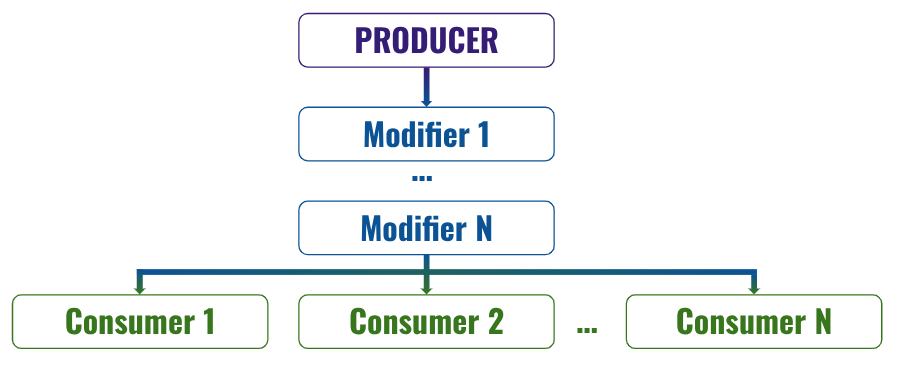
Each pipeline represents a directed processing flow that starts with a producer, optionally passes through modifiers, and ends with one or more consumers. This architecture allows developers to construct complex audio processing scenarios such as recording, streaming, enhancement, recognition, or playback.
The API is designed to support both real-time communication via WebSockets and control operations via REST endpoints.
With this mode:
-
You create and configure a session.
-
Within that session, you define and manage one or more pipelines.
-
Pipelines can be started, paused, resumed, or modified in real time.
-
Producers and consumers can be changed dynamically without recreating the underlying resources.
-
Multiple pipelines can run concurrently inside the same session.
-
Audio can be streamed continuously without requiring the session to be restarted after each result.
This architecture enables a more efficient and natural workflow:
-
Resources are instantiated once and reused.
-
Operations are no longer constrained to single-technology or single-shot tasks.
-
Input becomes continuous rather than transactional.
-
System behavior can evolve at runtime without tearing down the execution context.
From an input perspective, session mode allows uninterrupted audio flow. Results can be retrieved while the session remains active, eliminating the need to repeatedly stop and restart processing.
See the Google Slides for a quick overview of the pipeline basics and how it works:
https://docs.google.com/presentation/d/1B6vSKgeedHH5JlT9M4HE1-KyqyW3PCvg11k67g0vn1A/
Covers core components, data flow, and key processing steps.
This feature has been introduced recently within Vivoka’s ecosystem. Your feedback is essential to refine it further. If certain aspects of the workflow, configuration model, or runtime control could better match your needs, we encourage you to share your experience.This feature has been introduced recently, please help us make it a better fit to your needs by telling us what may be improved.
Vocabulary
Session
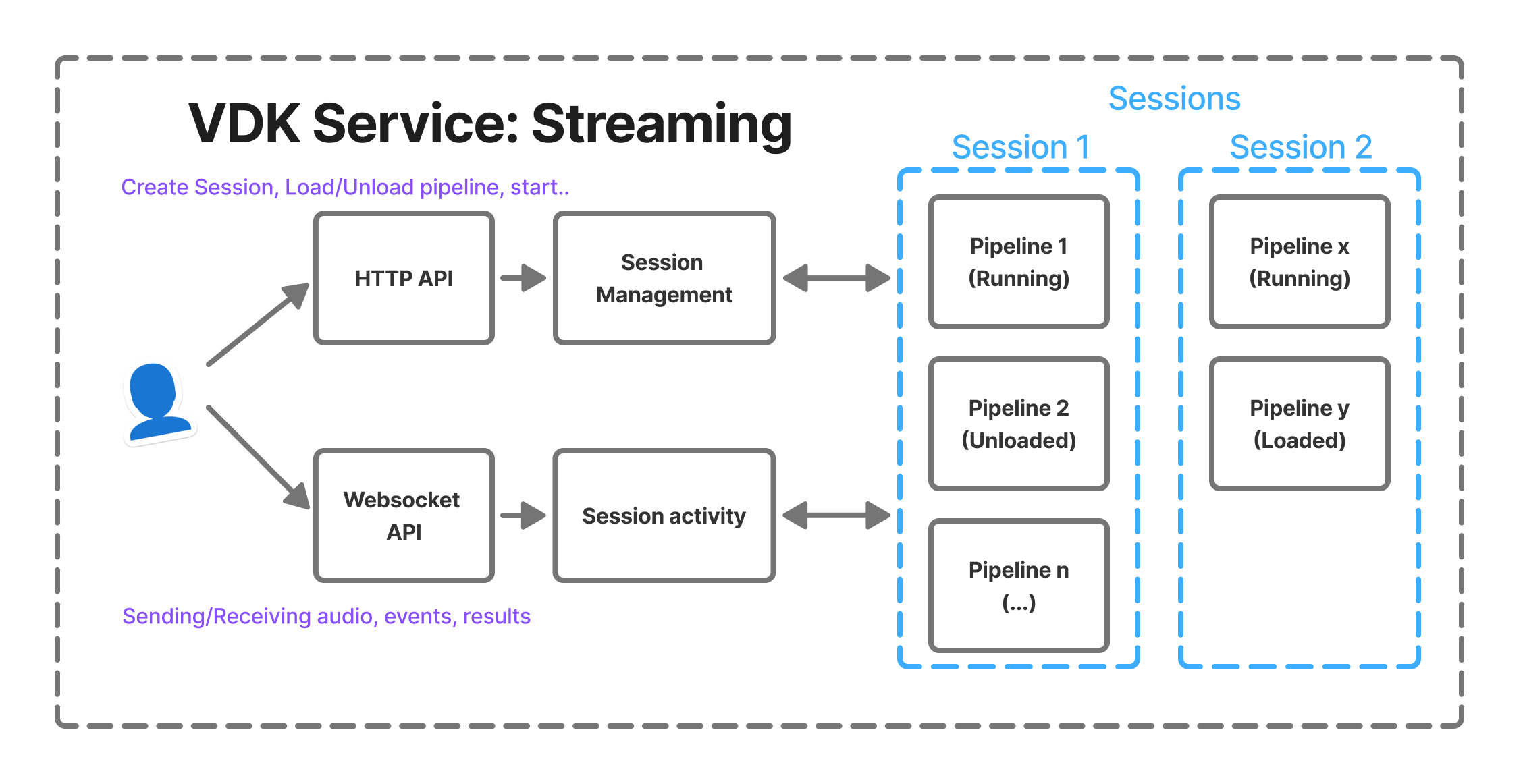
Sessions allow users to group multiple pipelines that share the same lifecycle and communication channel. A session acts as a logical container that organizes and manages the pipelines involved in an audio processing workflow.
When a session is created, the system does not immediately instantiate the processing engines or allocate runtime resources for the pipelines. Instead, the API stores the configuration parameters that describe the pipelines and their associated modules. This configuration includes the pipeline structure, the module types (producer, modifiers, and consumers), and their respective settings.
By deferring initialization, the system avoids allocating unnecessary resources before they are actually needed. The stored configuration serves as a blueprint that the system can use later to construct the full processing pipeline.
The actual initialization of modules and allocation of processing resources occurs only when the pipeline load operation is requested. At that moment, the system reads the previously stored configuration, instantiates the required modules, validates their parameters, and prepares the pipeline for execution. This separation between configuration and runtime initialization enables more efficient resource management and provides greater flexibility when defining or modifying pipelines before they are executed.
A session provide a WebSocket connection through which we can transfer data in real time. This connection can be used to:
-
Send audio data to pipelines that require streaming input
-
Receive processed audio
-
Receive processing events
-
Receive results (such as recognition output)
-
Receive error notifications
It’s important to connect to the WebSocket early so you can receive any errors and detect issues as soon as they occur.
Users can create multiple sessions simultaneously and manage them independently. Sessions must be deleted manually when they are no longer needed.
ASR recognizers, TTS channels, and speech enhancement enhancers, cannot be loaded simultaneously in multiple pipelines.
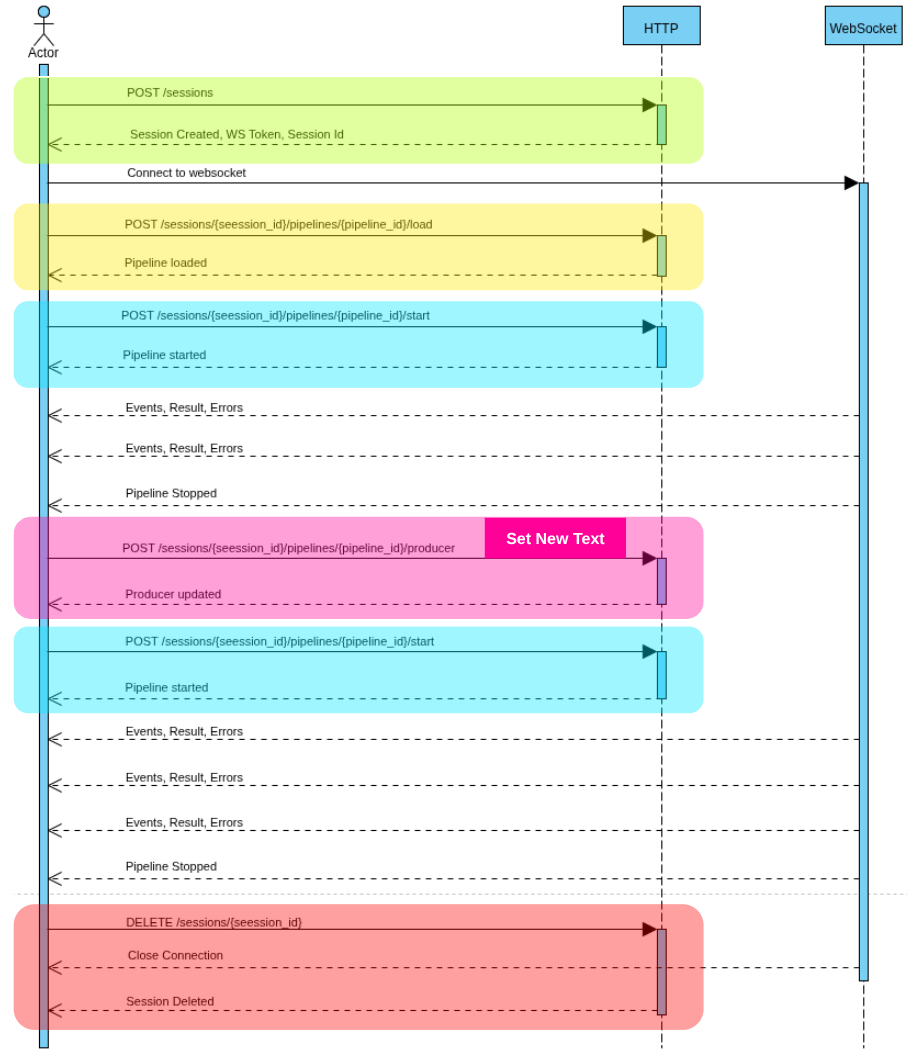
Session Lifecycle
A typical session lifecycle includes:
-
Creating the session with one or more pipelines
-
Loading and starting pipelines
-
Streaming audio (if required)
-
Stopping pipelines
-
Deleting the session
Pipeline
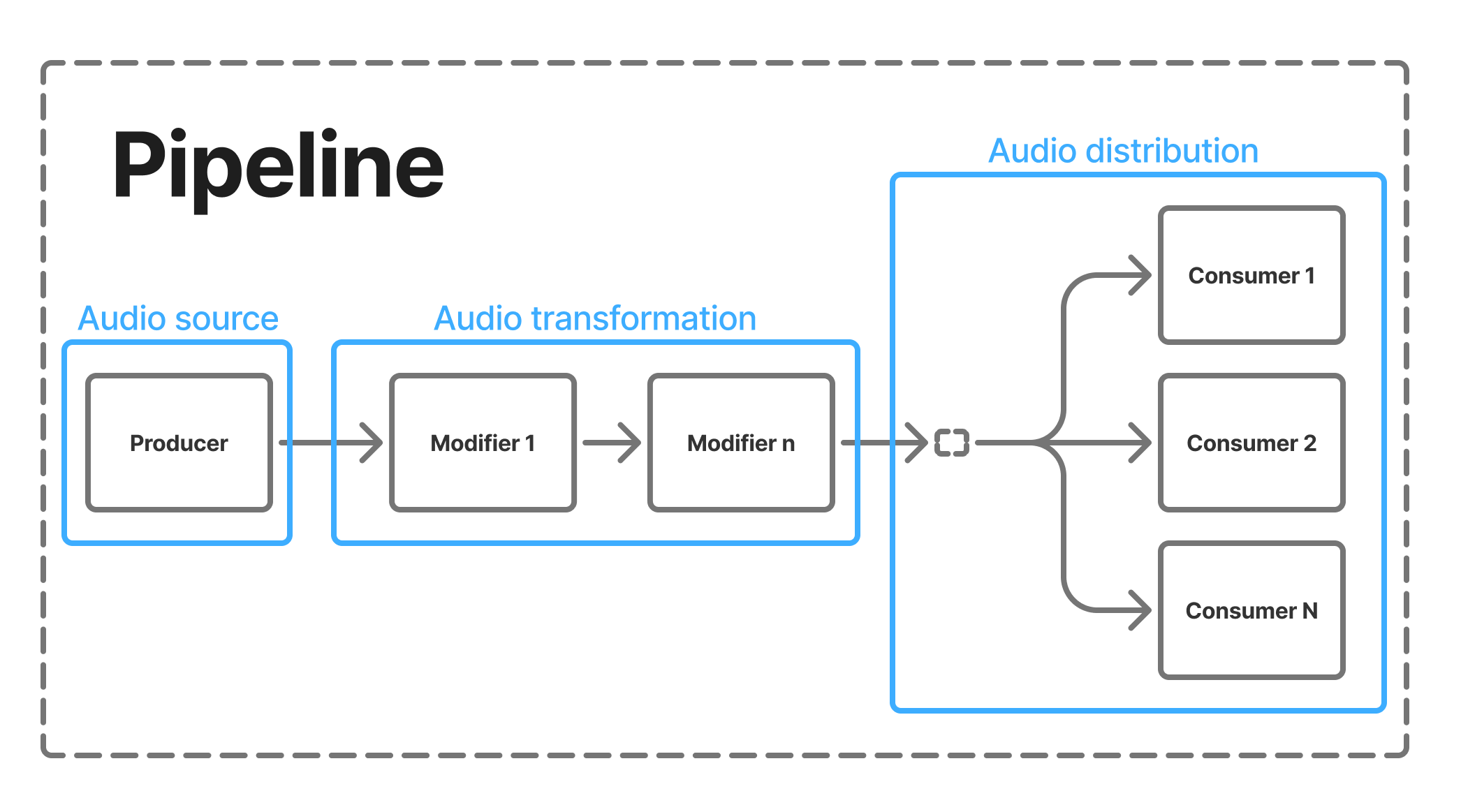
A pipeline is a processing chain that routes audio from a source to one or more processing endpoints.
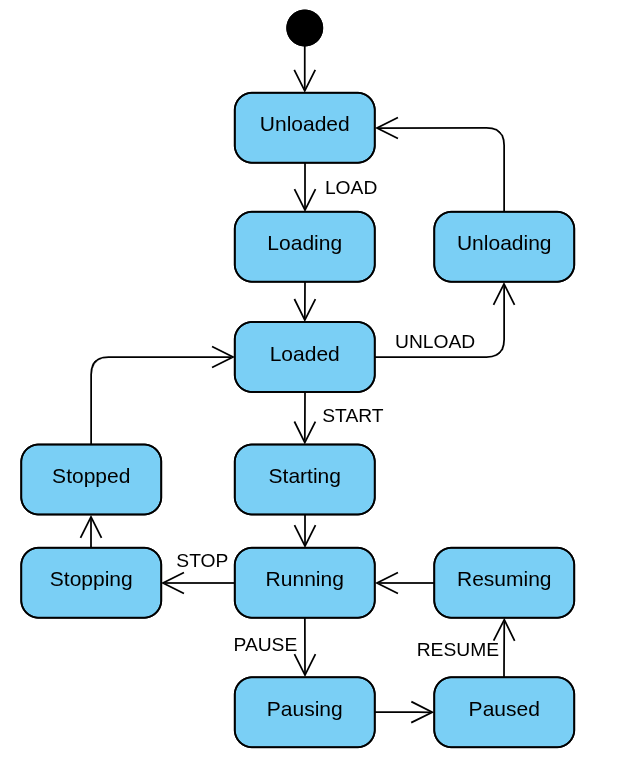
State transitions are controlled through the pipeline lifecycle endpoints (load, start, pause, resume, stop, unload).
Each pipeline is composed of three categories of components:
Producer → Modifiers → Consumers
Pipeline states
Each pipeline has an internal life-cycle state:
-
Unloaded: The pipeline is not initialized and holds no resources.
-
Loading: Resources are being allocated.
-
Loaded: Resources are ready, but the pipeline is not running.
-
Starting: The pipeline is transitioning to a running state.
-
Running: The pipeline is actively processing the incoming audio from producer.
-
Pausing: The pipeline is transitioning to a paused state.
-
Paused: Processing is temporarily halted.
-
Resuming: The pipeline is transitioning back to running.
-
Stopping: The pipeline is stopping execution.
-
Stopped: The pipeline has stopped but resources may still be allocated.
-
Unloading: Resources are being released.
Producer
Producers generate the initial audio stream that enters the pipeline.
They act as the source of audio data and can either capture, read, synthesize, or receive audio.
Available producers:
|
Producer Type |
Description |
|---|---|
|
AudioRecorder |
Captures audio from a recording device such as a microphone. |
|
File |
Reads audio data from a file stored on disk. |
|
Stream |
Accepts audio streamed from the client through the session WebSocket. |
|
VoiceSynthesis |
Generates speech audio from text input using speech synthesis technology. |
Modifiers
Modifiers process or transform the audio stream between the producer and consumers.
They are optional and can be chained together to build complex transformations.
Available modifiers:
|
Modifier Type |
Description |
|---|---|
|
ChannelExtractor |
Extracts a specific audio channel from multi-channel audio input. |
|
SpeechEnhancement |
Improves audio quality by reducing noise or enhancing speech clarity. |
Consumers
Consumers represent the endpoints of a pipeline. They receive processed audio data and perform actions such as playback, storage, or analysis.
A pipeline can have multiple consumers, enabling parallel outputs.
Available consumers:
|
Consumer Type |
Description |
|---|---|
|
AudioPlayer |
Plays audio through an output device. |
|
File |
Writes processed audio to a file. |
|
Stream |
Streams processed audio back to the client. |
|
VoiceBiometrics |
Performs speaker identification or verification. |
|
VoiceRecognition |
Converts speech to text using speech recognition. |
Usage
Running the VDK Service
The first step is to ensure that the VDK service is properly configured for your tasks. This means having the appropriate plugins installed (ASR, TTS, Biometrics) and the correct technology configuration (models, voices, enrolled users).
This configuration is done through VDK Studio. Refer to the corresponding documentation for detailed instructions.
Once your service is running, it is recommended to verify that the VDK Service is correctly configured by requesting the list of available models or voices depending on the relying technologies you’ve requested.
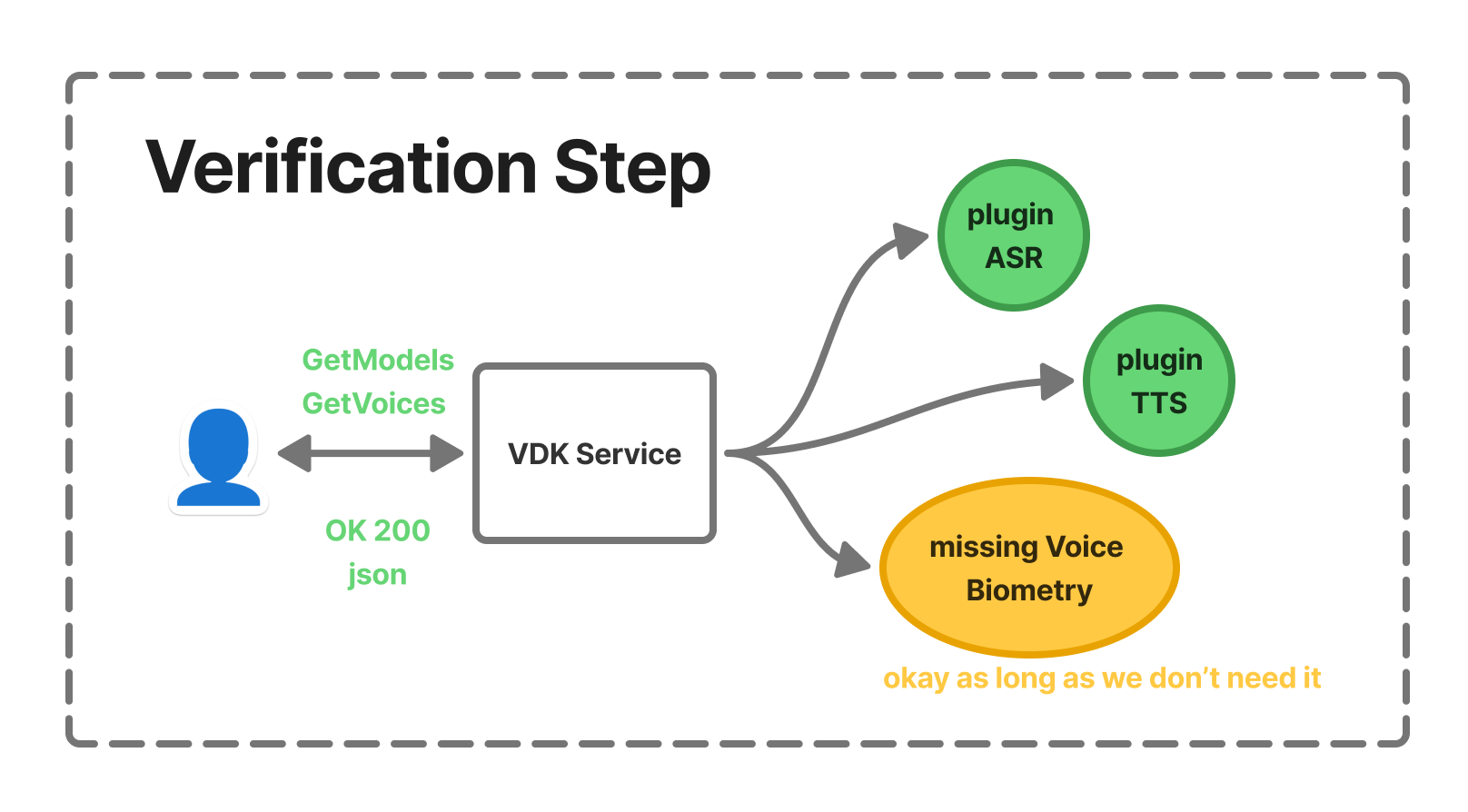
If a request fails or an internal error occurs, the HTTP response will contain a JSON object with an "errors" field describing what went wrong.
We recommend using a dedicated tool such as Postman to interact with and test the API.
Creating a session
A sample project is available in both C# and Python to help you get started quickly. Since the usage depends on your service configuration, you will need to adjust the placeholder configuration included in the sample project to match your setup.
The route used to create a session is the following.
[POST] /v1/sessions
The request must include a JSON body describing the session configuration with at least one pipeline. In the following example, the producer is an Audio File Producer and the consumer is Voice Recognition (ASR).
The pipeline therefore reads the file and processes it using speech recognition.
# Request JSON body
{
    "pipelines": {
        "myPipeline": {
            "producer": {
                "type": "File",
                "path": "path/to/myWav.wav",
                "sample_rate": 16000,
                "channels": 1
            },
            "consumers": {
                "myConsumer": {
                    "type": "VoiceRecognition",
                    "recognizer": "myRecognizer",
                    "models": [ "myModel" ],
                    "confidence": 0
                }
            }
        }
    }
}
If your configuration is valid, you should retrieve a token from the response.
# Response body (OK)
{
    "session_id": "7bc9e16c79-4442-2eac-bffc-22c30769bd"
}
It should be listed in the session list route.
[GET] /v1/sessions
If you are already familiar with the basic routes of the VDK Service, the process is the same. You connect to the session using the WebSocket API, which serves as the entry point for sending and receiving audio.
Running a pipeline
By default, pipelines are unloaded. You must first load them and then start them.
The loading phase serves two purposes:
-
Resolve potential resource conflicts: when a pipeline is loaded, it reserves the required resources.
-
Keep resources ready for fast restarts, preventing them from being released and reallocated, which would otherwise impact performance and startup time.
[POST] /v1/sessions/{sessionId}/pipelines/{pipelineId}/load
The request is synchronous, meaning it performs the loading operation and then returns an HTTP response code indicating whether the operation was successful.
If you are already connected to the session through a WebSocket, you will also receive an event on the socket similar to the following.
{'state': 'Loaded', 'type': 'PipelineStateChanged'}
Once the pipeline is loaded, you can start it. Depending on the consumer, it may stop automatically, and if you’re using a Stream producer, you will have to send the audio through the WebSocket.
[POST] /v1/sessions/{sessionId}/pipelines/{pipelineId}/start
Sending and receiving audio
You will receive audio on the WebSocket so be sure to be connected to the session.
Since a session can contain multiple pipelines, you must specify which pipeline you are sending audio to. Likewise, the service will indicate from which pipeline each event originates.
{
  "pipeline": "myPipeline"
  "data": "<base64AudioData>"
  "last": false|true
}
There is also a special case for Acoustic Echo Cancellation (AEC): to send the echo/reference signal, you must stream it through the socket with additional fields:
-
is_reference: Indicates that this audio contains only the echo/reference signal.
-
modifier: The name of the speech enhancement modifier in the pipeline.
{
  "pipeline": "myPipeline"
  "data": "<base64AudioData>"
  "last": false|true,
  "is_reference": true,
  "modifier": "my_speech_enhancer_name"
}
The WebSocket JSON request format:
Updating a pipeline
Each component of a pipeline may be updated depending on its type. For example, with Speech Recognition, you may want to change the model, or with a File producer, update the file being streamed into the pipeline.
You need identifiers and a corresponding JSON request body.
[PUT] /v1/sessions/{sessionId}/pipelines/{pipelineId}/producer
[PUT] /v1/sessions/{sessionId}/pipelines/{pipelineId}/modifiers/{modifierId}
[PUT] /v1/sessions/{sessionId}/pipelines/{pipelineId}/consumers/{consumerId}
Additional routes
It is also worth noting that a pipeline can be paused and resumed. You can also dynamically create new pipelines or delete existing ones. Those routes are documented in the HTTP Api → Sessions swagger documentation.
Sample project
To help you get started and experiment with this feature, please refer to our sample project available in the examples.
Configurations
For each component, there are two types of configuration:
-
Creation configuration: used during pipeline creation.
-
Update configuration: applied after the pipeline has been created.
You can update all fields except the type. Some parameters cannot be modified while the pipeline is running. The fields highlighted in blue indicate which parameters can still be updated when the pipeline is running
The available enum values and minimum/maximum constraints are defined in the raw JSON schema below.
Producers
Audio Recorder
Component type: AudioRecorder
For Linux/Windows:
|
Field |
type |
Required |
Default value |
Description |
|---|---|---|---|---|
|
type |
string |
yes |
- |
Component type: |
|
device |
string |
- |
|
Device to record |
|
host_api |
string |
- |
'' |
Top level grouping for audio devices |
|
sample_rate |
enum |
- |
16000 |
Sample Rate (Hz)
|
|
channels |
enum |
- |
1 |
Channels count (Mono/Stereo)
|
|
buffer_size |
integer |
- |
0 (any) |
An option to buffer audio in the producer until size is reached |
You can find a list of available devices using the routes:
[GET] /v1/audio/input-devices
For Android
|
Field |
type |
Required |
Default value |
Description |
|---|---|---|---|---|
|
type |
string |
yes |
- |
Component type: |
|
audio_source |
enum |
- |
|
Defines where recorded audio comes from (more). Values: |
|
sample_rate |
enum |
- |
16000 |
Sample Rate (Hz)
|
|
channels |
enum |
- |
1 |
Channels count (Mono/Stereo)
|
|
buffer_size |
integer |
- |
1024 |
An option to buffer audio in the producer until size is reached |
File Producer
Component type: File
|
Field |
type |
Required |
Default value |
Description |
|---|---|---|---|---|
|
type |
string |
yes |
- |
Component type: |
|
path |
string |
yes |
- |
Path to the audio file |
|
sample_rate |
enum |
- |
16000 |
Sample Rate (Hz)
|
|
channels |
enum |
- |
1 |
Channels count (Mono/Stereo)
|
|
buffer_size |
integer |
- |
1024 |
An option to buffer audio in the producer until size is reached |
|
acceleration_rate |
number |
- |
1.0 |
A way to stream audio faster than real time |
Voice Synthesis (TTS)
Component type: VoiceSynthesis
channel, voice and text cannot be updated while synthesizing text.
|
Field |
type |
Required |
Default value |
Description |
|---|---|---|---|---|
|
type |
string |
yes |
- |
Component type: |
|
channel |
string |
yes |
- |
TTS Channel name |
|
voice |
string |
yes |
- |
TTS Voice name |
|
text |
string |
- |
'' |
Text to synthesize |
Stream producer
Component type: Stream
|
Field |
type |
Required |
Default value |
Description |
|---|---|---|---|---|
|
type |
string |
yes |
- |
Component type: |
|
sample_rate |
enum |
- |
16000 |
Sample Rate (Hz)
|
|
channels |
enum |
- |
1 |
Channels count (Mono/Stereo)
|
Modifiers
Speech Enhancement
Component type: SpeechEnhancement
|
Field |
type |
Required |
Default value |
Description |
|---|---|---|---|---|
|
type |
string |
yes |
- |
Component type: |
|
enhancer |
string |
yes |
- |
Enhancer name |
Channel Extractor
Component type: ChannelExtractor
|
Field |
type |
Required |
Default value |
Description |
|---|---|---|---|---|
|
type |
string |
yes |
- |
Component type |
|
channel_index |
integer |
- |
0 |
Channel to extract |
Consumers
Audio Player
Component type: AudioPlayer
For Linux/Windows:
|
Field |
type |
Required |
Default value |
Description |
|---|---|---|---|---|
|
type |
string |
yes |
- |
Component type: |
|
device |
string |
- |
|
Output device name |
|
host_api |
string |
- |
'' |
Top level grouping for audio devices |
|
volume |
number |
- |
1.0 |
Output volume (ranging from 0.0 to 1.0) |
You can find a list of available devices using the routes:
[GET] /v1/audio/output-devices
For Android:
|
Field |
type |
Required |
Default value |
Description |
|---|---|---|---|---|
|
type |
string |
yes |
- |
Component type |
|
content_type |
enum |
- |
|
Defines the type of the sound (more)
|
|
usage |
enum |
- |
|
The usage type (more)
|
|
volume |
number |
- |
1.0 |
Output volume (ranging from 0.0 to 1.0) |
File Consumer
Component type: File
|
Field |
type |
Required |
Default value |
Description |
|---|---|---|---|---|
|
type |
string |
yes |
- |
Component type: |
|
path |
string |
yes |
- |
Path to the audio file |
|
truncate |
boolean |
- |
true |
Overwrite existing |
Stream Consumer
Component type: Stream
|
Field |
type |
Required |
Default value |
Description |
|---|---|---|---|---|
|
type |
string |
yes |
- |
Component type: |
|
buffer_size |
integer |
- |
0 (any) |
If set, buffers until the size reaches the threshold or the last buffer is received |
Voice Biometrics
Component type: VoiceBiometrics
|
Field |
type |
Required |
Default value |
Description |
|---|---|---|---|---|
|
type |
string |
yes |
- |
Component type: |
|
model_name |
string |
yes |
- |
Biometrics model name |
|
model_type |
enum |
yes |
- |
Values: |
|
mode |
enum |
yes |
- |
Values: |
|
username |
string |
- |
- |
Required for authentication |
Voice Recognition
Component type: VoiceRecognition
|
Field |
type |
Required |
Default value |
Description |
|---|---|---|---|---|
|
type |
string |
yes |
- |
Component type: |
|
recognizer |
string |
yes |
- |
Recognizer name |
|
models |
array |
yes |
- |
ASR models to run |
|
confidence |
integer |
- |
0 |
Minimum confidence threshold for results |
|
stop_at_first_result |
boolean |
- |
false |
Stop pipeline at first result |
|
models_settings |
object |
|
|
ASR models configuration object |
|
vec |
object |
- |
- |
Post-processor VEC configuration object |
|
start_time |
integer |
- |
- |
Is available only in update to set the model(s). |
models_settings.<model_name>
|
Field |
type |
Required |
Default value |
Description |
|---|---|---|---|---|
|
user |
string |
- |
- |
Optional UserWord user |
|
slots |
object |
- |
- |
Slot configuration for the model |
models_settings.<model_name>.slots.<slot_name>
|
Field |
type |
Required |
Default value |
Description |
|---|---|---|---|---|
|
values |
array |
- |
- |
List of values for the slot |
A complete configuration example is provided below for clarity.
{
    "type": "VoiceRecognition",
    "recognizer": "rec_eng-US",
    "models": [ "csdk-dynamic-drinks" ],
    "confidence": 0,
    "stop_at_first_result": false,
    "models_settings": {
        "csdk-dynamic-drinks": {
            "slots": {
                "drink": {
                    "values": [ "coffee", "tea" ]
                }
            },
            "user": "emmanuel"
        }
    },
    "vec": {
        "context": ["a 1 3", "b 1 4"],
        "accent": "eng"
    }
}